7. Network Layer: Routing (RIP, OSPF, BGP)
This chapter covers Part II Lecture 3. Chapter 6 showed how a router uses its routing table (forwarding). This chapter shows how the table gets filled in (routing).
The exam asks you to update a distance-vector table from the neighbours’ vectors, run Dijkstra’s algorithm step by step and give the next hops, explain count-to-infinity and poisoned reverse, and build a BGP table (AS paths, next hops, preferred path) with transit and policy.
The questions sit in drawers after the concept they test. Tutorial 2.2 Q4 (Dijkstra) has an official solution. Concept checks and extensions are unofficial. Past-year papers are not in these notes.
Quick reference
| Topic | Rule |
|---|---|
| Intra-AS / inter-AS | RIP and OSPF run inside one AS. BGP runs between ASes, over TCP. |
| Distance vector (RIP) | . Ignore your old table. Next hop = the best . |
| RIP metric | Hops. 16 = unreachable, so 1–15 are usable. Updates every 30 s, and when a route changes. |
| Count-to-infinity | A vector has no path, so two routers can feed each other. Limit 16 stops it. |
| Poisoned reverse | Tell your next hop that the destination is 16. Stops two-router loops only. |
| Link state (OSPF) | Hello → LSA → flood → LSDB → Dijkstra. Same map in every router, a different table in each. |
| Dijkstra | Settle the smallest tentative distance. Update its neighbours. Track predecessors. Next hop = first router after the source. |
| Hop count against cost | RIP picks the fewest hops. OSPF picks the lowest total configured cost. |
| BGP route choice | Reject a path with your own ASN. Highest local preference. Then shortest AS path. Prepend your ASN when you advertise. |
| BGP table next hop | The neighbour’s interface on the shared link. |
| Transit | Needs an export policy that passes routes between neighbours. Multihomed does not mean transit. |
1. Where Routes Come From
A routing table lists destination networks and how to reach them, usually through a next-hop router. An entry can come from three places:
- Directly connected networks: the router knows these from its own interfaces.
- Static routes: an administrator types them in.
- Dynamic routing protocols: routers exchange information with each other and update the routes when the network changes.
Forwarding is looking up the table for each packet. Routing is how the table gets filled in.
Typing routes by hand works for a tiny network. In a large network, links change, and the networks belong to different organisations. So we need routing protocols.
2. Two Levels of Routing
2.1 Autonomous systems
- An autonomous system (AS) is a group of IP networks and routers under one administration with one routing policy. Examples: a university campus, an ISP, a data centre.
- An AS number (ASN) identifies the AS. An IP prefix identifies a destination network inside it.

2.2 Intra-AS and inter-AS
| Intra-AS (inside one AS) | Inter-AS (between ASes) | |
|---|---|---|
| Protocols | RIP, OSPF (called IGPs, interior gateway protocols) | BGP |
| Policy | One administrator sets common goals. | Each AS decides which routes it accepts and which traffic it carries. |
| Performance | Can find efficient paths with a shared cost measure. | Business agreements and policy can matter more than the shortest path. |
| Scale | One organisation’s network. | The whole Internet is too large for one detailed map. ASes share reachability, not their internal links. |
3. Distance Vector: RIP
3.1 The idea
RIP (Routing Information Protocol) is a distance-vector protocol used inside an AS.
- A distance vector is a list: for each destination network, the router’s current distance to it.
- Each router sends its distance vector to its neighbours (the routers directly connected to it). It does this regularly (about every 30 s) and also when a route changes (a triggered update).
- RIP normally measures distance in hops: each router crossed costs 1.
3.2 The update rule (Bellman–Ford)
When router X gets a vector from neighbour N:
The next hop for that destination is the neighbour that gave the minimum.
- With normal RIP, .
- If the question gives a link cost, add that cost instead of 1. Example: a neighbour reports 4 and the link costs 3. The total is 7, via that neighbour.
3.3 Worked example: building A’s table (lecture)
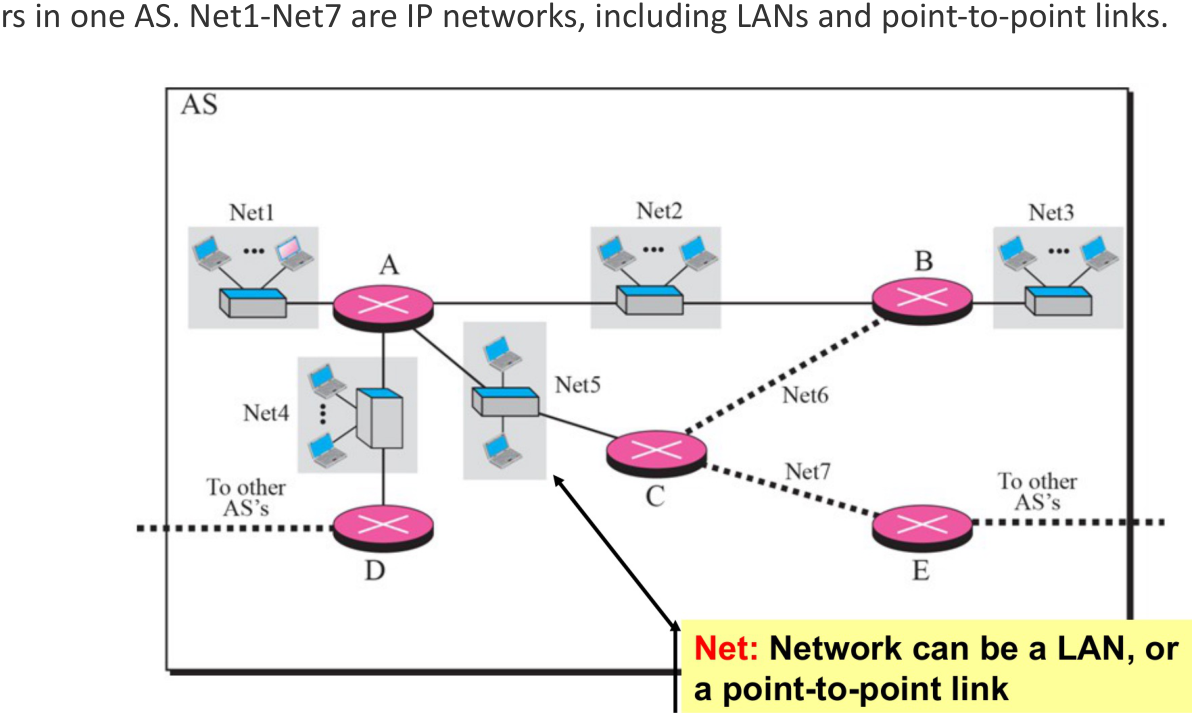
- Start: A knows only its own networks: Net1, Net2, Net4 and Net5, each with distance 1 and next hop “direct”.
- A gets reports: B reports Net2, Net3 and Net6 at distance 1. C reports Net5, Net6 and Net7 at 1. D reports Net4 at 1.
- A adds 1 to each reported distance and keeps the smallest:
| Destination | Distance | Next hop |
|---|---|---|
| Net1, Net2, Net4, Net5 | 1 | direct |
| Net3 | 2 | B |
| Net6 | 2 | B or C (a tie) |
| Net7 | 2 | C |
When later updates do not change any entry, the routes have converged.
3.4 Worked example: distance vector with link costs
Router G has three neighbours. The link costs that G measures are: to H = 4, to J = 1, to K = 6. G receives these vectors (destinations in the order G, H, J, K, M, N):
- from H: (4, 0, 3, 5, 2, 7)
- from J: (1, 4, 0, 4, 6, 3)
- from K: (6, 5, 4, 0, 3, 2)
Step 1. Add the link cost to every entry of each vector. Then take the smallest total in each row:
| Destination | Via H (+4) | Via J (+1) | Via K (+6) | Best | Next hop |
|---|---|---|---|---|---|
| G | — | — | — | 0 | — |
| H | 4 | 5 | 11 | 4 | H |
| J | 7 | 1 | 10 | 1 | J |
| K | 9 | 5 | 6 | 5 | J |
| M | 6 | 7 | 9 | 6 | H |
| N | 11 | 4 | 8 | 4 | J |
Step 2. G’s new table is (0, 4, 1, 5, 6, 4) with next hops (–, H, J, J, H, J).
Two points to notice:
- K is a neighbour, but G does not use the direct link to reach it. The direct link costs 6. The path through J costs . Distance vector always picks the lowest total, not the direct link.
- G ignores its old table. The new table depends only on the neighbours’ new vectors and the link costs. G’s own entry is always 0.
3.5 The problem: count-to-infinity
A vector gives only a distance, not the path. So a router cannot see that a neighbour’s route goes back through itself.
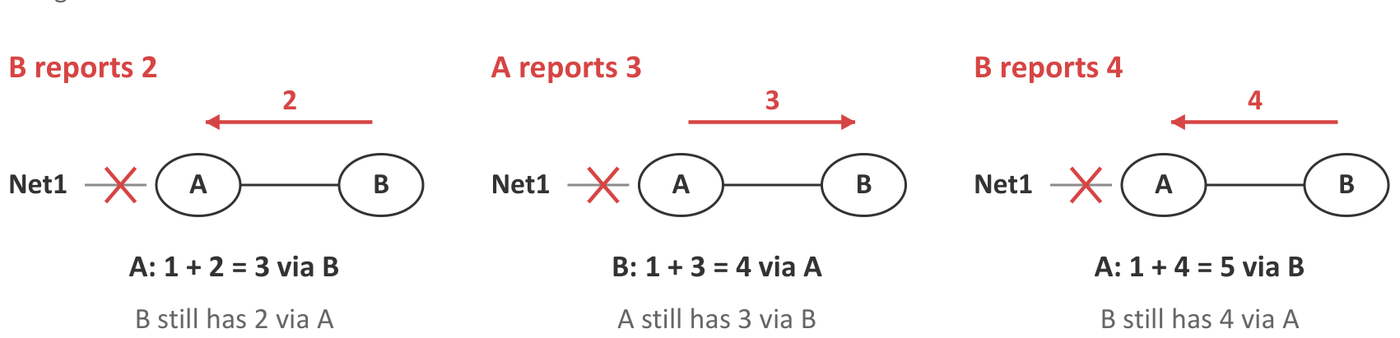
- Before the failure: A reaches Net1 directly (1). B reaches Net1 through A (2).
- A’s link to Net1 fails.
- Before B hears this, B tells A: “Net1: 2”. A thinks it has a new path: via B. But B’s route goes through A. Packets now loop between A and B.
- A tells B “3”. B updates to via A. A updates to 5. This goes on and on.
Each router keeps adding 1 to the other’s distance. This is count-to-infinity.
3.6 Safeguards
1. RIP’s limit: 16 = infinity. RIP treats a distance of 16 as unreachable. So the count stops at 16. The usable distances are 1 to 15.
This limit also restricts the network. With a cost of 5 per hop, 3 hops give 15 (reachable), but 4 hops give 20, which becomes 16 (unreachable), even though the path exists.
2. Poisoned reverse. A router tells its next hop for a destination that it cannot reach that destination (distance 16).

- B reaches Net1 through A. So B tells A: “Net1 = 16”. In effect: “You cannot reach Net1 through me, because I reach it through you.”
- B does this all the time, even while the route works.
- If A’s link then fails, A will not use B as an alternative.
- Poisoned reverse stops two-router loops. Loops of three or more routers can still happen.
In RIP, a neighbour’s vector tells the router the full path to each destination.
False. A vector gives only the distance. That is why a router cannot see that a neighbour’s route goes back through itself, and why count-to-infinity happens.
Poisoned reverse stops every routing loop in a distance-vector network.
False. It stops loops between two routers. Loops through three or more routers can still happen.
With RIP, a destination 4 hops away with a cost of 5 per hop is still reachable.
False. , and 16 means unreachable. Three hops (15) would still work.
4. Link State: OSPF
4.1 The idea
OSPF (Open Shortest Path First) is a link-state protocol used inside an AS.
- RIP shares distances to destinations. OSPF shares links and their costs.
- Every router collects every link report and builds a map of the whole area.
- Each router then runs Dijkstra’s algorithm on the map to find the least-cost path from itself to every destination.
- An OSPF cost is a number that an administrator sets. Lower is better. It is commonly based on bandwidth, so links need not count equally.
4.2 Hop count against link cost
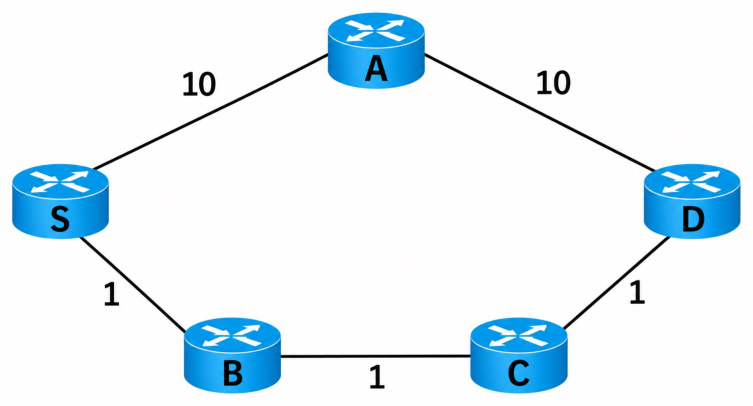
| Path | Hops (RIP) | Cost (OSPF) |
|---|---|---|
| S–A–D | 2 | 20 |
| S–B–C–D | 3 | 3 |
RIP chooses the 2-hop path. OSPF chooses the path with cost 3. The difference comes from the metric.
4.3 The five steps of OSPF
- Discover neighbours: each router sends Hello packets on its links. (On Ethernet they go by multicast, so no list of neighbours is needed.) Regular Hellos also check that the neighbours still answer.
- Describe local links: each router builds a link-state advertisement (LSA) that lists its own links and their costs. It does not need to know the rest of the network.
- Flood the reports: each new LSA is passed from neighbour to neighbour through the whole area (a group of routers that share detailed link information). OSPF acknowledges LSAs, sends them again if they are lost, and ignores duplicates and old copies.
- Build the database: each router stores every LSA in its link-state database (LSDB). This is the map. After convergence, every router in the area has the same map.
- Calculate routes: each router runs Dijkstra from its own position. So the routing tables differ, even though the maps are the same.
4.4 Dijkstra’s algorithm
Terms:
- Tentative distance: the best cost found so far.
- Settled: a router whose distance is confirmed as the minimum.
- Predecessor: the router just before this one on the best path.
Steps:
- Give the source distance 0 and every other router .
- Settle the unsettled router with the smallest tentative distance.
- For each neighbour of that router: if (settled distance + link cost) is less than the neighbour’s tentative distance, update it and record the predecessor.
- Repeat steps 2 and 3 until every router is settled.
- To get the next hop for a destination, follow the predecessors back to the source. The first router after the source is the next hop.
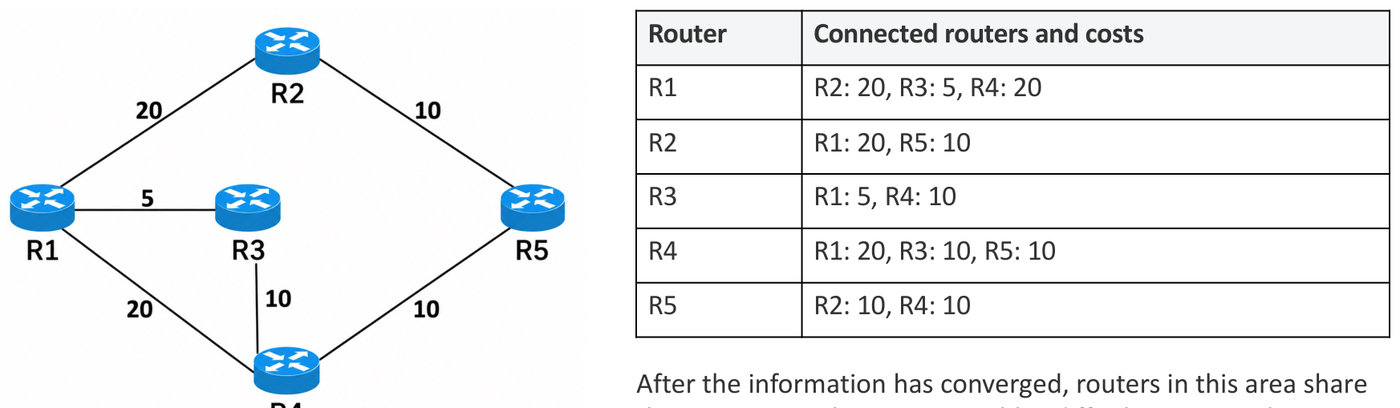
4.5 Worked example (lecture)
Links: R1–R2 = 20, R1–R3 = 5, R1–R4 = 20, R2–R5 = 10, R3–R4 = 10, R4–R5 = 10. The source is R1.
| Settled | R2 | R3 | R4 | R5 |
|---|---|---|---|---|
| R1 | 20 (R1) | 5 (R1) | 20 (R1) | ∞ |
| R1, R3 | 20 | 5 | 15 (R3) | ∞ |
| R1, R3, R4 | 20 | 5 | 15 | 25 (R4) |
| R1, R3, R4, R2 | 20 | 5 | 15 | 25 (via R2 it would be 30, so keep 25) |
| all | 20 | 5 | 15 | 25 |
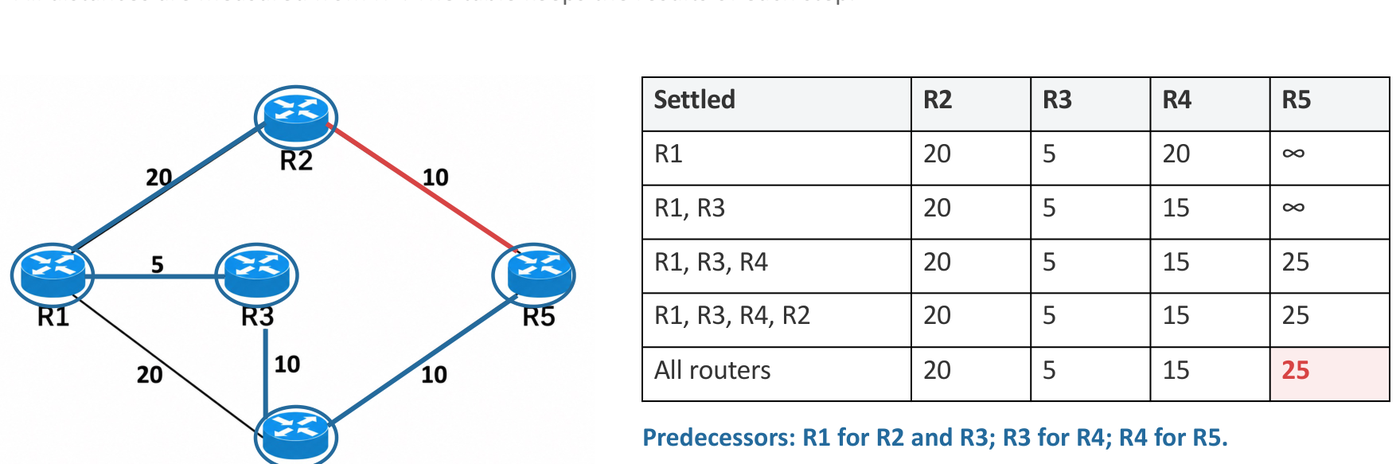
| Destination | Cost | Path | Next hop from R1 |
|---|---|---|---|
| R2 | 20 | R1–R2 | R2 |
| R3 | 5 | R1–R3 | R3 |
| R4 | 15 | R1–R3–R4 | R3 |
| R5 | 25 | R1–R3–R4–R5 | R3 |
Router paths to IP prefixes. If each network attachment costs 2, then a network behind R5 (10.11.0.0/16) costs , and the next hop is still R3.
After the R3–R4 link fails: R3 and R4 notice the failure. They send new LSAs, and flooding spreads them. R1 removes the link from its map and runs Dijkstra again. Now R4 = 20 (direct), and R5 = 30 through either R2 or R4. These are equal-cost paths, and OSPF can use both.

4.6 Tutorial 2.2 Q4
Tutorial 2.2 Q4. Using Dijkstra’s algorithm, generate the least cost routes to all other nodes from the source node A in the following figure. The integer numbers in the figure represent the link costs.
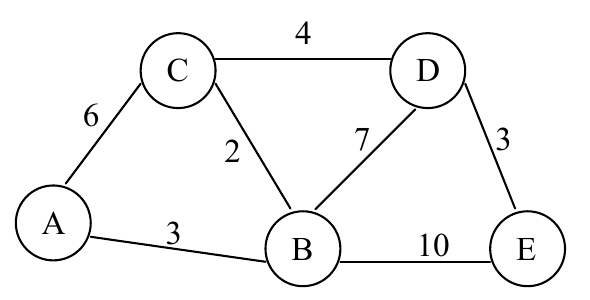
Answer
Each cell is the tentative distance, with the predecessor in brackets. The bold cell is the one that gets settled next.
| Settled | B | C | D | E |
|---|---|---|---|---|
| A | 3 (A) | 6 (A) | ∞ | ∞ |
| A, B | 3 | 5 (B) | 10 (B) | 13 (B) |
| A, B, C | 3 | 5 | 9 (C) | 13 |
| A, B, C, D | 3 | 5 | 9 | 12 (D) |
| all | 3 | 5 | 9 | 12 |
- After B is settled (3): C drops from 6 to . D becomes and E becomes .
- After C is settled (5): D drops from 10 to .
- After D is settled (9): E drops from 13 to .
Follow the predecessors back from each node. The least-cost routes from A:
| Destination | Cost | Path | Next hop from A |
|---|---|---|---|
| B | 3 | A–B | B |
| C | 5 | A–B–C | B |
| D | 9 | A–B–C–D | B |
| E | 12 | A–B–C–D–E | B |
All four routes leave A through B. Check: the path costs are , , and . ✓
General method: Dijkstra on a small graph
- Draw a table with one column per router and one row per step. Row 1: the source’s neighbours at their link cost, the others at ∞.
- Settle the router with the smallest tentative distance (mark it). It never changes again.
- For each unsettled neighbour of that router: new distance = settled distance + link cost. Keep the smaller number and note the predecessor.
- Repeat until all are settled. The last row is the answer.
- Read each path backwards through the predecessors. The next hop is the router right after the source.
- A direct link is not always the best path: B–D costs 7, but B–C–D costs .
Extension 4.1. Run Dijkstra on the same graph from source C. Give the cost, path and next hop for each destination.
Answer (Extension 4.1)
C’s neighbours are A (6), B (2) and D (4).
| Settled | A | B | D | E |
|---|---|---|---|---|
| C | 6 (C) | 2 (C) | 4 (C) | ∞ |
| C, B | 5 (B) | 2 | 4 | 12 (B) |
| C, B, D | 5 | 2 | 4 | 7 (D) |
| C, B, D, A | 5 | 2 | 4 | 7 |
| all | 5 | 2 | 4 | 7 |
| Destination | Cost | Path | Next hop from C |
|---|---|---|---|
| B | 2 | C–B | B |
| D | 4 | C–D | D |
| A | 5 | C–B–A | B (not the direct link, which costs 6) |
| E | 7 | C–D–E | D |
Check: the table in the order of settling is B (2), D (4), A (5), E (7). ✓
Extension 4.2. The link A–B fails. Run Dijkstra again from A. How do the costs and next hops change?
Answer (Extension 4.2)
A now has one neighbour, C (6).
| Settled | B | C | D | E |
|---|---|---|---|---|
| A | ∞ | 6 (A) | ∞ | ∞ |
| A, C | 8 (C) | 6 | 10 (C) | ∞ |
| A, C, B | 8 | 6 | 10 (C) | 18 (B) |
| A, C, B, D | 8 | 6 | 10 | 13 (D) |
| all | 8 | 6 | 10 | 13 |
Every route now leaves through C. The costs rise: B from 3 to 8, C from 5 to 6, D from 9 to 10, E from 12 to 13.
In D’s row, B–D gives , which is worse than , so C stays the predecessor. For E, the path through D () beats the path through B ().
Extension 4.3 (distance vector). Now use distance vector on the same graph. Router D has link costs B = 7, C = 4 and E = 3. Its neighbours report these vectors, in the order (A, B, C, D, E):
- from B: (3, 0, 2, 6, 9)
- from C: (5, 2, 0, 4, 7)
- from E: (12, 9, 7, 3, 0)
Find D’s new table and its next hops.
Answer (Extension 4.3)
Add the link cost to every entry of each vector, then take the smallest in each row.
| Destination | Via B (+7) | Via C (+4) | Via E (+3) | Best | Next hop |
|---|---|---|---|---|---|
| A | 10 | 9 | 15 | 9 | C |
| B | 7 | 6 | 12 | 6 | C |
| C | 9 | 4 | 10 | 4 | C |
| D | — | — | — | 0 | — |
| E | 16 | 11 | 3 | 3 | E |
D’s table is (9, 6, 4, 0, 3). B is a neighbour, but the direct link (7) loses to the path through C (). Check: Dijkstra from D on the same graph gives the same distances (A 9, B 6, C 4, E 3).
4.7 A second example: the direct link is not always best
Links: S–A = 2, S–B = 5, A–B = 1, A–C = 6, B–C = 2, B–D = 7, C–D = 1. The source is S.
| Step | Settled | A | B | C | D |
|---|---|---|---|---|---|
| 0 | S | 2 (S) | 5 (S) | ∞ | ∞ |
| 1 | S, A | 2 | 3 (A) | 8 (A) | ∞ |
| 2 | S, A, B | 2 | 3 | 5 (B) | 10 (B) |
| 3 | S, A, B, C | 2 | 3 | 5 | 6 (C) |
| 4 | all | 2 | 3 | 5 | 6 |
At step 1, B’s distance drops from 5 to 3. The direct link S–B costs 5, but the path S–A–B costs only . A tentative distance can go down until the router is settled. It never changes after that.
| Destination | Cost | Path | Next hop from S |
|---|---|---|---|
| A | 2 | S–A | A |
| B | 3 | S–A–B | A |
| C | 5 | S–A–B–C | A |
| D | 6 | S–A–B–C–D | A |
To read a path, follow the predecessors back from the destination: D’s predecessor is C, C’s is B, B’s is A, and A’s is S. Reverse the list to get S–A–B–C–D.
5. RIP Against OSPF
| RIP (distance vector) | OSPF (link state) | |
|---|---|---|
| What is shared | Distances to destinations, with neighbours only | Link costs, flooded to the whole area |
| How routes are found | Add the cost to the neighbour to the neighbour’s distance (Bellman–Ford) | Run Dijkstra on the full map |
| Usual metric | Hop count (configured costs are possible) | Configured cost, often based on bandwidth |
| Metric range | Total of 15 at most (16 = unreachable) | Much wider |
| After a failure | Can count to infinity. Poisoned reverse stops two-router loops. | Flood the changed LSA, then recalculate. Converges fast. |
| Knowledge | Each router knows only its neighbours’ vectors | Each router knows the whole area’s map |
OSPF routers find routes with the Bellman–Ford algorithm.
False. OSPF is link state: each router builds the map and runs Dijkstra. RIP (distance vector) uses Bellman–Ford.
After OSPF converges, every router in the area has the same routing table.
False. Every router has the same map (the LSDB). But each one runs Dijkstra from its own position, so the tables differ.
An OSPF link cost is a delay that the router measures.
False. The cost is a number that an administrator sets, often based on bandwidth. “Shortest” means the lowest total cost, not the fewest hops.
6. Inter-AS Routing: BGP
6.1 Types of AS
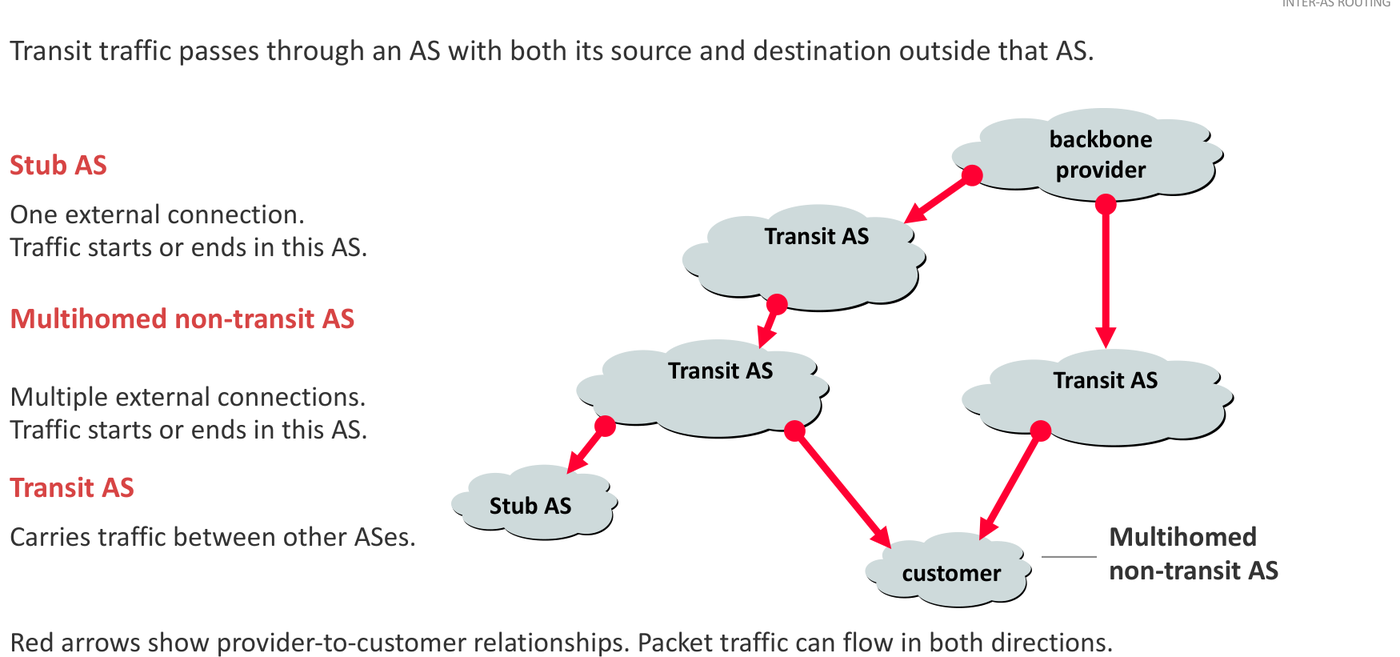
Transit traffic passes through an AS when both its source and its destination are outside that AS.
| Type | External connections | Carries transit traffic? |
|---|---|---|
| Stub AS | One | No. Traffic starts or ends here. |
| Multihomed non-transit AS | More than one | No. Traffic starts or ends here. |
| Transit AS | Several | Yes. It carries traffic between other ASes. |
6.2 Business relationships
- Customer–provider (transit): the customer (for example a campus) pays the provider to reach the rest of the Internet.
- Peering: two ASes (P and Q) exchange traffic between their own networks and customers. They do not give each other unlimited transit. Peering is often free (settlement-free), but paid peering also exists.
6.3 Why not run OSPF over the whole Internet?
- Policy: each AS decides whose traffic it carries and which routes it offers. A physical link does not mean permission to use it.
- Policy can beat performance: a business agreement can matter more than a shorter path.
- Scale: ASes exchange reachability without sharing every internal router, link and change.
6.4 What BGP is
- BGP (Border Gateway Protocol) exchanges reachability information between ASes.
- A border router (gateway router) connects its AS to another AS.
- eBGP (external BGP): route exchange between routers in different ASes.
- iBGP (internal BGP): route exchange between routers in the same AS. It spreads routes learnt from outside to the other routers inside.
- BGP sends its messages over TCP.
6.5 What BGP sends: path vectors
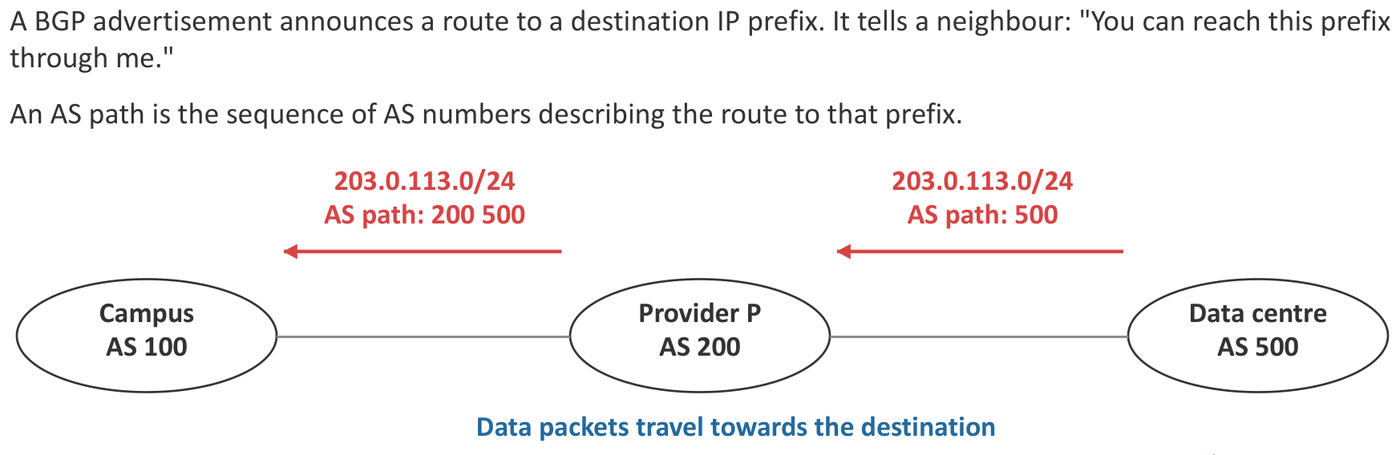
A BGP advertisement says: “You can reach this prefix through me.” It carries the AS path: the list of AS numbers on the route to that prefix. So BGP is a path-vector protocol.
- When an AS advertises a route to another AS, it adds (prepends) its own ASN to the front of the path.
- The data packets travel in the opposite direction to the advertisements.
6.6 How an AS chooses and passes on routes
Import policy: which received routes the AS accepts, and what preference it gives them. Export policy: which routes it advertises to each neighbour.
Route selection (in this course):
- Loop check: reject any AS path that already contains your own ASN.
- Local preference: choose the route with the highest local preference first. The AS sets this value with its import policy.
- If preferences are equal: choose the shortest AS path.
- If export policy allows, advertise the chosen route to the next AS with your own ASN prepended.
Lecture example. Campus AS 100 gets three routes to the same prefix:
| Via | AS path | Decision |
|---|---|---|
| P | 200 500 | Choose (2 ASes) |
| Q | 300 400 500 | Usable, but longer (3 ASes) |
| Another neighbour | 600 100 500 | Reject: it contains our ASN 100 (a loop) |
If the campus advertises its route, the path becomes 100 200 500.
Must the campus choose the shorter path? No. If traffic through Q is cheaper, the campus gives Q’s routes a higher local preference. Local preference is checked before the AS-path length, so the longer path through Q wins.
6.7 Multihomed does not mean transit

The campus connects to providers P and Q. It uses P’s route to the data centre for its own traffic. If it advertised that P-learnt route to Q, Q could send its traffic through the campus. The campus would then carry transit traffic.
The campus stops this with its export policy: it does not advertise P’s routes to Q (or Q’s routes to P). It still advertises its own prefix to both providers. Choosing a route for your own traffic and offering a route to another AS are separate decisions.
6.8 When a false announcement spreads (YouTube, 2008)
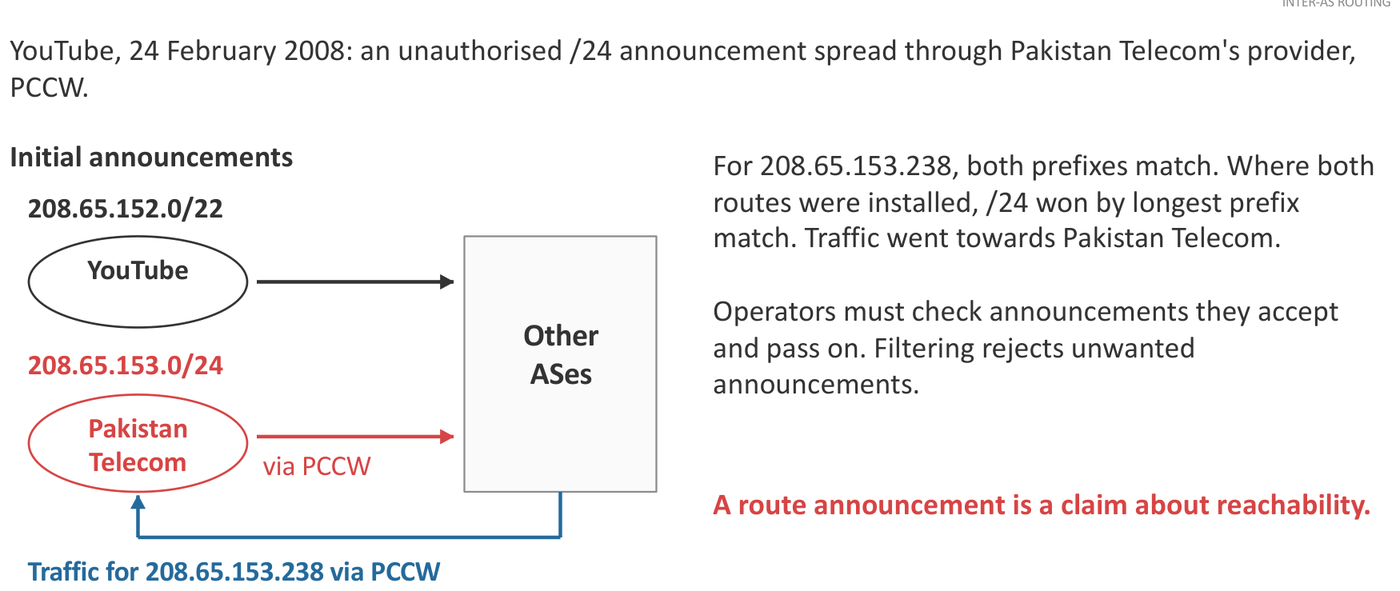
- YouTube announced 208.65.152.0/22.
- Pakistan Telecom announced 208.65.153.0/24 without authority, and its provider (PCCW) passed it on.
- For 208.65.153.238, both prefixes match. Routers that installed both chose the /24 by longest-prefix match. So the traffic went to Pakistan Telecom.
Lessons: a route announcement is only a claim about reachability. Operators must filter the announcements they accept and pass on. RPKI origin validation checks whether an AS is allowed to announce a prefix. It does not check the whole AS path.
6.9 Building a BGP table
A BGP table lists, for each prefix, every route the AS has received. Each route shows the next hop and the AS path. One route per prefix is marked as preferred.
E1. AS 300’s BGP table. Four ASes are joined by these links:
| Link | Addresses on the link |
|---|---|
| AS 100 – AS 200 | AS 100: 192.0.2.1, AS 200: 192.0.2.2 |
| AS 200 – AS 300 | AS 200: 198.51.100.1, AS 300: 198.51.100.2 |
| AS 300 – AS 400 | AS 300: 203.0.113.1, AS 400: 203.0.113.2 |
| AS 200 – AS 400 | AS 200: 192.0.2.5, AS 400: 192.0.2.6 |
Each AS owns one prefix: AS 100 has 172.16.1.0/24, AS 200 has 172.16.2.0/24, AS 300 has 172.16.3.0/24, and AS 400 has 172.16.4.0/24. There is no local-preference setting. Write AS 300’s BGP table, with the next hop, the AS path and the preferred route for each prefix.
Answer (E1)
AS 300 has two neighbours, AS 200 and AS 400, so it can hear up to two routes for each prefix. The shortest AS path wins. The next hop is the neighbour’s interface address on the shared link.
| Network prefix | Next hop | AS path | Preferred? |
|---|---|---|---|
| 172.16.1.0/24 (AS 100) | 198.51.100.1 | 200 100 | Yes |
| 172.16.1.0/24 (AS 100) | 203.0.113.2 | 400 200 100 | |
| 172.16.2.0/24 (AS 200) | 198.51.100.1 | 200 | Yes |
| 172.16.2.0/24 (AS 200) | 203.0.113.2 | 400 200 | |
| 172.16.4.0/24 (AS 400) | 203.0.113.2 | 400 | Yes |
| 172.16.4.0/24 (AS 400) | 198.51.100.1 | 200 400 |
AS 300 has no row for 172.16.3.0/24, its own prefix. Any route whose path contains 300 would be rejected as a loop.
General method: a BGP table for one AS
- For each other prefix, start at the AS that owns it. Its first advertisement has the path “owner”.
- Each AS that passes the route on prepends its own ASN.
- The route reaches your AS through one neighbour. The path starts with that neighbour’s ASN. The next hop is that neighbour’s address on the link to your AS.
- List one row for every neighbour that can supply the route. A neighbour supplies it only if its export policy allows.
- Reject any path that contains your own ASN.
- Mark the preferred row: highest local preference first, then the shortest AS path.
E2. Traceroute across ASes. In the network of E1, a host 172.16.1.10 in AS 100 runs traceroute to 172.16.3.30 in AS 300. The packets follow the preferred path 100 → 200 → 300. Each router replies with its interface towards the source. Which addresses does the trace list?
Answer (E2)
| Hop | Address | Why |
|---|---|---|
| 1 | 172.16.1.1 | AS 100’s router, on the host’s LAN |
| 2 | 192.0.2.2 | AS 200’s interface towards AS 100 |
| 3 | 198.51.100.2 | AS 300’s interface towards AS 200 |
| 4 | 172.16.3.30 | The destination |
The trace shows the link addresses on the source’s side of each router, because each router replies with its interface towards the source.
BGP messages are sent over UDP.
False. BGP runs over TCP.
An AS that connects to two providers is a transit AS.
False. A multihomed AS carries transit traffic only if its export policy passes routes between its providers. Without that, it is a multihomed non-transit AS.
In a BGP table, the next hop is a router deep inside the neighbouring AS.
False. The next hop is the neighbour’s interface on the shared link.
RPKI origin validation checks the whole AS path of a route.
False. It checks only whether the origin AS may announce the prefix. It does not check the path.
Exam patterns
Tutorial source: Tutorial 2.2 Q4 (Dijkstra). The other patterns come from the lecture’s own examples. Past-year papers are not in these notes.
| Question type | How to attack it | Trap |
|---|---|---|
| Dijkstra table and next hops | Step table with predecessors. Settle the smallest. Read paths backwards. | Taking the direct link. Settling a node twice. Giving the whole path as the next hop. |
| Distance-vector update | Add the link cost to each neighbour’s vector, take the minimum per row | Adding 1 instead of the link cost. Using the old table. |
| Count-to-infinity | Show the distances rising by 2 each round. Limit 16. | Saying poisoned reverse stops every loop |
| Hop count against cost | RIP counts hops, OSPF adds costs. Compare both paths. | Using costs for RIP |
| OSPF failure | Flood the new LSA, rerun Dijkstra, look for equal-cost paths | Forgetting that the other routers must rerun it too |
| BGP route choice | Loop check, local preference, shortest AS path, prepend | Local preference after path length |
| BGP table | One row per neighbour that can supply the route, next hop on the shared link | Listing your own prefix. Using a next hop inside another AS. |
| Transit and policy | Export policy decides what you offer. Import policy decides what you accept. | Mixing “my route choice” with “what I advertise” |
| True/false | RIP is distance vector. OSPF is link state and uses Dijkstra. BGP runs over TCP. | See Common Traps |
Common Traps
- Distance vector: for each destination, take . The next hop is that . Ignore your old table.
- The direct link to a neighbour is not always the best route to it. Compare it with the paths through the other neighbours.
- With link costs, add the link cost, not 1.
- RIP: 16 = unreachable, so totals 1–15 are usable. A long path can be “unreachable” even though it exists.
- Poisoned reverse = advertise 16 to your own next hop, all the time. It stops two-router loops only.
- OSPF: Hello, LSA, flooding, LSDB, Dijkstra. Every router has the same map but a different table.
- An OSPF cost is configured. It is not a measured delay. “Shortest” means lowest total cost, not fewest hops.
- Dijkstra: write the step table with the predecessor in brackets. Settle the smallest tentative distance each time. The next hop is the first router after the source.
- BGP: reject a path that contains your own ASN. Then highest local preference, then shortest AS path. Prepend your ASN when you advertise.
- In a BGP table, the next hop is the neighbour’s interface on the shared link, not a router deep inside another AS.
- A multihomed AS avoids transit with its export policy.
- BGP runs over TCP. OSPF uses Dijkstra. RIP uses Bellman–Ford.
- RPKI checks who may announce a prefix (the origin). It does not check the whole AS path.